





How finance teams control spend before it hits the ledger with Sage Intacct and PEX

Sage Intacct gives finance teams a strong accounting foundation. It handles your general ledger, reporting and multi-entity structure with precision.
Like most accounting systems, the real challenge doesn’t happen inside Sage Intacct. It happens before transactions ever get there.
Employee purchases, vendor payments and reimbursements often arrive late, incomplete or incorrectly coded. Finance teams spend valuable time fixing data instead of reviewing it.
PEX solves that problem. PEX connects directly to Sage Intacct to control spend before it hits the ledger, so transactions arrive clean, coded and fully documented. The result is less manual work, faster close cycles and more reliable financial data.
What is Sage Intacct and who is it built for?
Sage Intacct is a cloud-based financial management system built for mid-sized organizations that need flexibility, visibility and strong reporting.
More than 14,000 organizations use it across industries like construction, nonprofit, healthcare and manufacturing. These teams use Sage Intacct to manage complex financial structures across multiple entities, locations and projects.
Finance teams use Sage Intacct to:
- manage the general ledger
- track expenses across dimensions like department, project or location
- consolidate financials across entities
- support reporting and compliance
Sage Intacct structures financial data. But it depends on clean inputs to work effectively. PEX ensures that data arrives clean.
How does the Sage Intacct and PEX integration work?
Once you connect PEX to Sage Intacct, both systems stay aligned automatically.
PEX syncs Sage Intacct dimensions into tags, including expense account, department, project and location. Finance teams include custom dimensions to match their reporting structure. From there, spending follows a controlled workflow.
Cardholders use their PEX Visa® Commercial Card or PEX Visa® Prepaid Card to make purchases. As transactions happen, PEX applies coding rules automatically or guides the cardholder to select the right tags. Cardholders submit receipts in real time through text, mobile or desktop, so documentation stays attached from the start.
After approval, PEX syncs transactions directly into Sage Intacct with:
- the correct dimensions
- attached receipts
- full transaction details
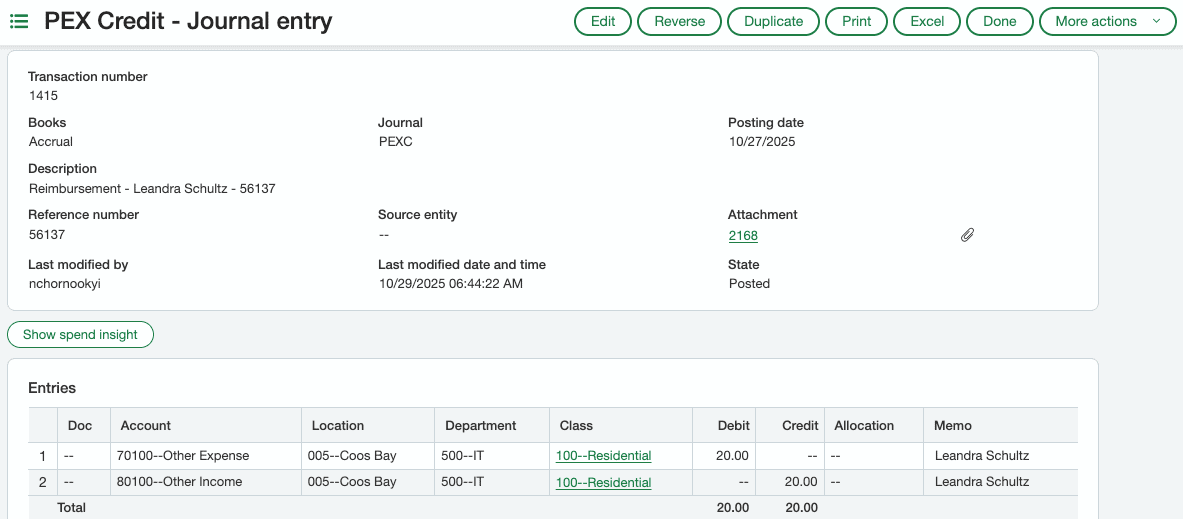
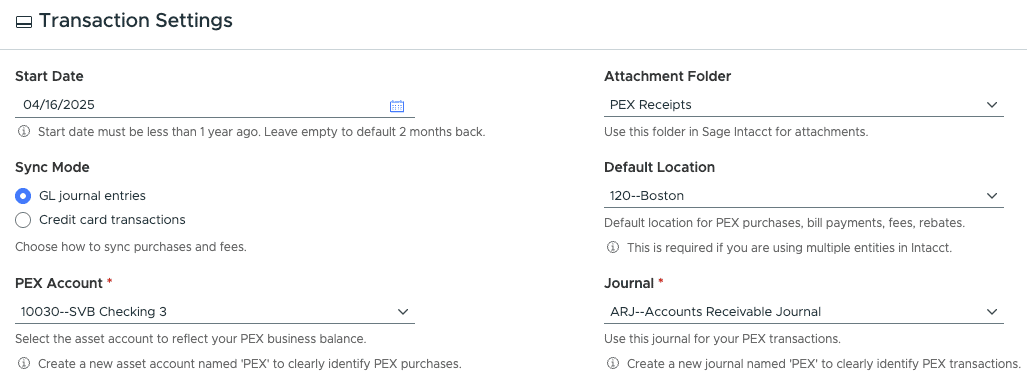
The sync is flexible and allows admins to sync purchase information:
- as Journal Entries
- as Credit Card Transactions
There’s no need for CSV uploads or manual entry. PEX moves every transaction from purchase to journal entry without extra steps.
How does the integration reduce reconciliation work?
The biggest shift happens at month-end. Instead of chasing receipts and fixing coding errors, finance teams open Sage Intacct and review complete transactions. This shift has a measurable impact. According to The Total Economic Impact™ of PEX study, by Forrester Consulting, organizations have saved up to 8,700 hours annually by reducing manual reconciliation, receipt collection and coding work.
PEX captures and syncs:
- purchases
- fees
- rebates
- transfers
- credit payments
- reimbursements
PEX sends transactions into Sage Intacct fully coded and documented, so finance teams spend less time on cleanup and more time reviewing financials.
This reduces:
- back-and-forth with employees
- manual reclassification
- delays during close
How does PEX ensure accurate GL coding in Sage Intacct?
PEX improves data accuracy before transactions ever reach the ledger. Finance teams can control how coding happens by:
- limiting which dimensions each cardholder can use
- enforcing dimension relationships so combinations stay valid
- applying automatic coding rules with Auto Tagger
This ensures transactions follow your Sage Intacct structure from the start. Instead of fixing errors later, you prevent them entirely.
Can Sage Intacct dimensions and custom fields sync with PEX?
Yes. The integration supports a full range of Sage Intacct dimensions, including:
- expense account
- class
- customer
- project
- location
- department
- employee
- item
- warehouse
- billable
- user-defined dimensions
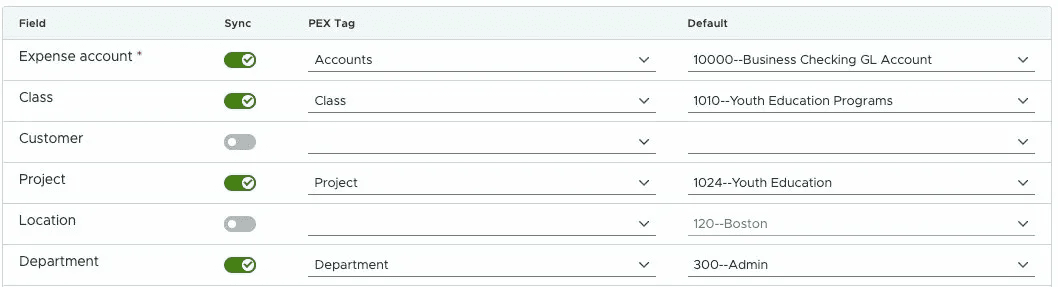
User-defined dimensions are critical for teams with more complex reporting needs. Because of the two-way sync, both systems stay aligned without manual updates.
How does the integration support multi-entity organizations?
For finance teams managing multiple entities, complexity grows quickly. PEX connects to Sage Intacct at the top level and allows transactions to post at the sub-entity level using location. This keeps your entity structure intact while reducing manual allocation work. As your organization grows, the workflow scales with you without adding operational overhead. As transaction volume grows, automation also helps teams scale without adding headcount.
Manage vendor payments with Sage Intacct and PEX
PEX manages vendor payments alongside employee expenses in the same workflow. Finance teams can create vendor cards directly from their Sage Intacct vendor list and control spend at the vendor level. This works well for recurring payments, project-based expenses and vendor-specific controls.
By managing both employee spend and vendor payments in one system, finance teams keep everything aligned and synced into Sage Intacct without fragmentation.
Sage Intacct and PEX: how does the integration improve audit readiness?
Audit readiness starts long before an audit begins. PEX captures receipts, coding and approvals in real time, so every transaction that syncs into Sage Intacct is already complete. This creates a consistent audit trail with:
- attached receipts
- accurate coding
- full transaction history
Finance teams don’t need to reconstruct documentation later. It’s already there.
How do Sage Intacct and PEX help finance teams scale?
As organizations grow, transaction volume increases faster than finance team capacity. Manual processes that worked at a smaller scale start to slow everything down. The Sage Intacct and PEX integration replaces those manual steps with automation across:
- receipt collection
- coding
- transaction syncing
This allows finance teams to manage higher volume without increasing administrative work. Organizations using PEX have saved hundreds of hours each year by reducing manual reconciliation and streamlining expense workflows.
Sage Intacct and PEX: the perfect partners for your finance team
Sage Intacct is where financial data lives. PEX is where financial data gets created.
In comparison to other expense management tools PEX:
- offers a true two-way sync
- supports custom dimensions
- supports vendor card creation
- enables full transaction syncing (not partial)
As a result: When you connect PEX and Sage Intacct, you create a complete system that lets you:
- control spend before it happens
- capture clean data throughout the month
- close faster with fewer surprises
Instead of fixing transactions after the fact, you prevent issues from happening in the first place. Unlike tools that rely on exports or partial syncs, PEX keeps Sage Intacct and your spend workflows continuously aligned. That means no rework, no data gaps and no delays at month-end.
PEX is constantly improving the integration based on feedback from customers and partners. Get a personalized demo of how PEX works with your Sage Intacct environment.
FAQs
- What is the best expense management software with Sage Intacct integration?
The best solution offers a direct two-way sync, supports Sage Intacct dimensions and automates receipts, coding and reconciliation. PEX is built to do this natively.
- Does PEX integrate directly with Sage Intacct?
Yes. PEX integrates through a direct API connection with full two-way sync between Sage Intacct and PEX.
- Can I control how transactions are coded before they sync?
Yes. Finance teams can restrict dimensions, enforce dependencies and automate coding to ensure accuracy before transactions reach Sage Intacct.
- Does the PEX and Sage Intacct integration support multi-entity accounting?
Yes. PEX connects at the top level and supports posting transactions at the sub-entity level.
- Can receipts captured in PEX be synced into Sage Intacct?
Yes. Receipts captured in PEX sync with each transaction, creating a complete and audit-ready record.



Opinions, advice, services, or other information or content expressed or contributed here by customers, users, or others, are those of the respective author(s) or contributor(s) and do not necessarily state or reflect those of The Bancorp Bank, N.A. (“Bank”). Bank is not responsible for the accuracy of any content provided by author(s) or contributor(s).