





PEX Product updates: automated receipts, an AI Agent and clearer visibility into your spend

Missing receipts. Extra logins. Vendor cards that expire at the worst possible time. None of that moves your business forward.
Our latest updates clear that friction out of the way. Receipts collect themselves, an AI Agent that helps you set up faster and your Dashboard shows you more at a glance. Here’s what’s new.
Receipt management, upgraded
Getting a receipt from point of purchase into your books has always been one of the messiest parts of expense management. A driver who never got a paper receipt. An Uber charge that lands in someone’s personal inbox. A legitimate expense where the receipt just doesn’t exist. We’ve spent the last several months closing those gaps.
No-touch receipt collection from Microsoft Outlook (Beta)
If your organization runs on Microsoft 365, PEX can now connect directly to your Cardholders’ Outlook inboxes. Once connected, PEX automatically scans for receipts and invoices and matches them to open transactions, no action required.
Cardholders opt in, set a filter to exclude internal emails and choose which messages to capture. From there, PEX handles the rest: scan, extract, match and log. Every matched transaction is tagged to show the receipt came from Outlook and it syncs to OneDrive for reconciliation and audit.

No forwarding. No manual uploads. No chasing. We’re in beta now — contact us for early access.
Submit receipts from any email or phone number
Submitting a receipt by text or email used to require a Cardholder’s phone number or email address to be registered in PEX. That works for individual, assigned cards. It breaks down everywhere else.
Think of a shared Driver card or Runner card used by whoever’s on shift that day, or an Uber receipt that lands in a personal inbox and needs to be forwarded along. In both cases, the sender’s contact info isn’t registered with PEX and the receipt goes unmatched.
Now Cardholders can submit receipts from any email address or phone number, no pre-registration required. PEX confirms the match using an auth code plus transaction details, merchant, amount and the card’s last four digits, with expiration windows and match-confidence thresholds built in to guard against fraudulent submissions.
The result: a cleaner path for shared cards, generic roles and forwarded receipts and fewer unmatched transactions for your back office to sort out.

A legitimate path when receipts are genuinely gone
Sometimes a receipt simply doesn’t exist. A vendor never sent one. A screen-only slip disappeared. A paper receipt got destroyed. Until now, the only outcome was Auto Enforcer blocking the card on day 7. That can feel like a frustrating dead end for Cardholders and a time sink for back-office teams chasing documentation that will never materialize.
Enter the Lost-Receipt Affidavit: a built-in workflow that lets Cardholders attest that a receipt is genuinely unavailable, add a short business purpose statement and submit for approval, all from the same screen where they’d normally upload a receipt.
The affidavit routes through your existing approval workflow automatically, no new setup required. Approvers review the attestation alongside the transaction details and approve or decline it right where they already work. Once approved, PEX stores a timestamped PDF affidavit and treats it the same as any other receipt across Auto Enforcer, Auto Tagger and your audit log.
If a Cardholder later finds the original receipt, they can upload it directly. It supersedes the affidavit and the transaction reverts to a normal received state.
Admins control the feature, including the threshold conditions for submitting an affidavit, through a toggle in their business profile. No more blocked cards on expenses that are real. You won’t have to spend more back-and-forth on receipts that don’t exist.

Meet the PEX AI Agent
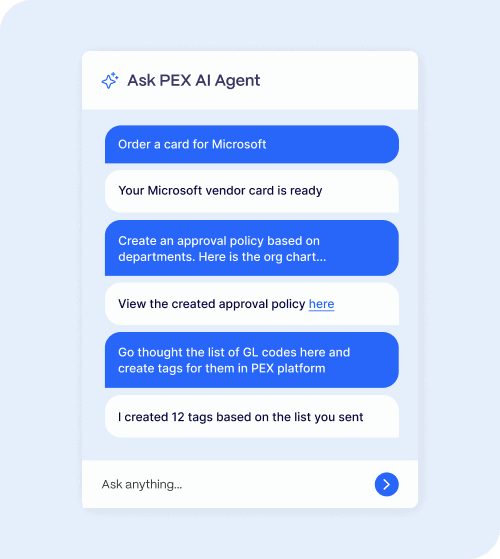
Getting started with PEX just got a lot simpler. Instead of hunting through menus or help docs, you can now just ask, and the PEX AI Agent does the heavy lifting for you.
Setup that fits into your day, not your week
Rolling out a new spend management platform usually means blocking off hours to learn a new system. The AI Agent changes that. It lives right in your Dashboard and guides you step by step through everything you need to get up and running:
• Ordering cards
• Funding accounts
• Setting spend policies
• Creating tags for tracking and reporting
• Connecting your integrations
Tell it what you’re trying to do, and the Agent walks you through it or takes the action for you, in real time.
Enterprise-grade security, built in
Every action the Agent takes on your account is protected by enterprise-grade security, so you can move fast without worrying about your data.
The faster you’re set up, the sooner you get value from PEX: full visibility into your spend, tighter control over policies and less time on manual admin. The AI Agent gets you there in minutes, not weeks.
Ready to see it in action? Request a demo →
See your business at a glance with Dashboard analytics
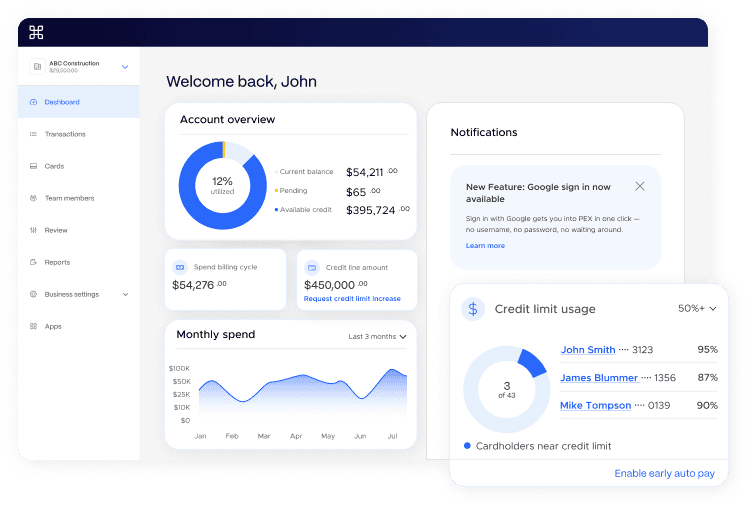
Numbers alone only tell part of the story. Dashboard analytics turns your PEX Dashboard into a visual command center, with charts and summary widgets that help you spot trends, catch issues early and make better financial decisions, all without leaving the Dashboard.
See your credit utilization (the percentage of your credit line currently in use), Cardholders who are close to their credit limits and more. You’ll find analytics widgets throughout the Dashboard, plus the Cards, Transactions and Team members pages.
Sign in with Google
Passwords slow you down. Sign in with Google gets you into PEX in one click — no username, no password, no waiting around.
How it works
PEX uses OpenID Connect (OIDC) to verify your identity with Google. Click “Sign in with Google,” and we check that your Google account matches a linked PEX account. Match confirmed, and you’re in — simple as that.
Use it everywhere you use PEX:
• PEX Dashboard (web) at dashboard.pexcard.com
• PEX mobile app — iOS and Android
One less password to remember. One more reason logging in feels effortless.

What’s next? We are expanding our log in capabilities to Microsoft. Stay in the know here.
A cleaner, faster mobile experience
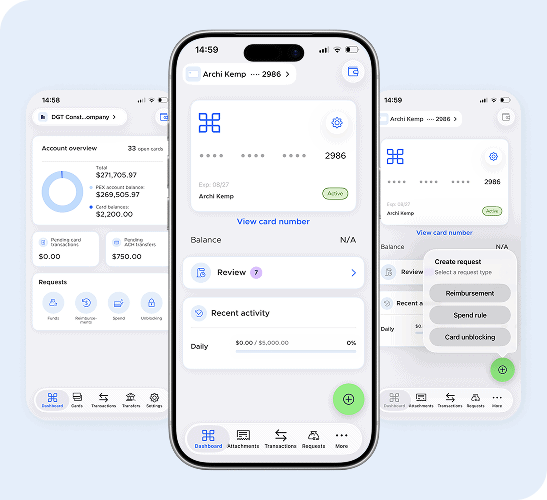
We’ve given the PEX mobile app a UI/UX refresh to make everyday tasks feel effortless. New quick action buttons let cardholders request funding, submit reimbursements or ask for spend increases in just a few clicks, no digging through menus required. Combined with a cleaner layout and more intuitive navigation, the app now guides both cardholder and admin users straight to what they need. The result: less friction and a mobile experience that feels as fast as the rest of your day.
Vendor cards that renew themselves
Vendor cards are built for recurring relationships such as a SaaS subscription, a preferred supplier or a standing service contract. But when a card expires, that relationship hits a wall. Subscriptions lapse, vendors get declined and someone in your back office has to track down every affected account and reissue it manually.
We’ve automated that. For any vendor card with 6 or more months left before it expires, PEX now generates and activates a replacement card and updates the card details automatically, so the vendor relationship continues without interruption and without anyone having to step in.
As a result, your team won’t have any more surprise declines, and you won’t have to deal with more manual reissuance queues.
A new way to manage travel spend: PEX and Perk-AmTrav
Travel is one of the hardest expense categories to control. Decisions happen fast, often outside finance’s direct view and by the time a flight or hotel shows up for review, there’s nothing left to do but flag it and move on.
That’s why we partnered with Perk-AmTrav: to bring travel booking, payment and policy into a single, real-time workflow.
Here’s what the partnership makes possible:
• Booking and payment connected from the start, so every transaction carries the right context automatically
• Custom spend controls by category, amount, timeframe or trip type, checked against policy the moment employees book or pay
• Automated receipt matching and a direct sync to your accounting platform, so most of the reconciliation work is already done by month-end

The result: finance teams catch out-of-policy spend before it happens instead of after and employees get a simpler trip from booking to expense report, with less reliance on reimbursements.
Learn more about PEX and Perk-AmTrav →
Coming soon: Reimbursements sync to Aplos
If you run your books on Aplos, your existing PEX Connector for Aplos just got more complete. We’re adding reimbursement syncing to the connector you already use, so approved reimbursements now flow straight from PEX into Aplos alongside every other transaction — no manual re-entry.
Reimbursements cover the spend that doesn’t happen on a card: an employee who paid out of pocket, a mileage claim or a purchase where a PEX card wasn’t an option. Until now, your card transactions, rebates, transfers and fees synced to Aplos on their own, while approved reimbursements had to be keyed in by hand. That gap is closed.
How it works
Turn on reimbursement sync and PEX posts each approved reimbursement to Aplos as a balanced journal entry, using the fund, account, contact and tag mappings you set. You control it all from the connector’s settings:
- Flip a single toggle to enable reimbursement syncing
- Choose your default Aplos fund, account and contact mappings
- Manage tag-mapping rules right alongside your existing setup
PEX only syncs reimbursements that have been approved, and skips anything it’s already posted — so you won’t see duplicate entries. Your current mappings for transfers, fees and rebates stay exactly as they are.
The result: every dollar of employee spend — on a card or out of pocket — flows into Aplos on its own, so your books stay current and month-end reconciliation is one less manual step.
Why these updates matter
Every update here is built around the same three priorities:
• Automation, to eliminate repetitive work
• Control, to reduce risk and errors
• Visibility, so you always know where your business stands
Put together, they mean less time chasing receipts, logins and card renewals and more time on the decisions that actually grow your business.
See these updates in the PEX app
These updates are live in the PEX platform now. Request a personalized demo to see them in action, or log in to your Dashboard to start using them today.
FAQ
What is the PEX AI Agent?
The PEX AI Agent is a built-in assistant that helps you set up your PEX account — ordering cards, funding accounts, setting spend policies, creating tags and connecting integrations. Describe what you need, and it walks you through it or completes the action for you
How does no-touch receipt collection from Outlook work?
PEX connects directly to a Cardholder’s Microsoft Outlook inbox (currently in beta), scans for receipts and invoices and matches them to open transactions automatically. Matched receipts are tagged as coming from Outlook and synced to OneDrive
Can Cardholders submit receipts without a registered email or phone number?
Yes. Cardholders can submit receipts from any email address or phone number. PEX confirms the match using an auth code and transaction details like merchant, amount and the card’s last four digits
What is the Lost-Receipt Affidavit?
It’s a workflow for transactions where a receipt genuinely doesn’t exist. Cardholders attest to that, add a business purpose statement and submit it through your existing approval workflow. Approved affidavits, are treated the same as any other receipt
How does sign in with Google work in PEX?
PEX uses OpenID Connect to verify your Google identity against a linked PEX account. Once matched, you’re signed in without a username or password, on both the web Dashboard and the PEX mobile app
Do PEX vendor cards expire?
Vendor cards with 6 or more months of validity left are automatically reissued and activated before they expire, so recurring vendor relationships continue without interruption
What is the PEX and AmTrav partnership?
PEX and AmTrav connect travel booking, payment and expense management into one workflow, so finance teams can enforce travel policy in real time and catch out-of-policy spend before it happens, instead of after the trip is booked



Opinions, advice, services, or other information or content expressed or contributed here by customers, users, or others, are those of the respective author(s) or contributor(s) and do not necessarily state or reflect those of The Bancorp Bank, N.A. (“Bank”). Bank is not responsible for the accuracy of any content provided by author(s) or contributor(s).