





A year of innovation: how PEX helped modern finance teams simplify expense management in 2025

Finance teams today are expected to do more with less—greater oversight, tighter budgets, faster closes. At the same time, AI innovation is raising expectations for what a modern finance stack should look like. Manual reconciliation, slow approvals and fragmented tools are no longer acceptable. Modern teams want automation, accuracy and transparency built into every step of their expense management process.
In 2025, we doubled down on building those capabilities. From AI-powered GL coding to expanded reporting, approvals and credit features- PEX introduced enhancements designed to remove friction from daily work and make year-end close faster and more predictable. Explore some of the product updates that shaped the year and are helping our customers set the stage for an even stronger 2026.
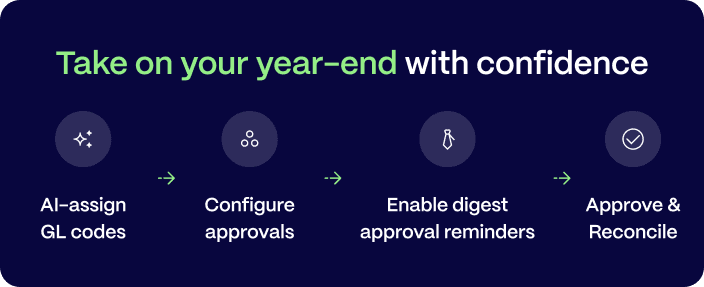
Reduce manual work and categorize expenses with AI-powered GL coding
During year-end close, finance teams face the highest transaction volume of the year, making accuracy and speed essential. To help teams stay ahead, PEX introduced AI-powered GL coding, a feature that automatically recommends an expense category, tailored to your account, the moment a transaction hits the system.
The AI reviews historical patterns, cardholder details and receipt or invoice data to deliver accurate GL code suggestions without the manual review that slows teams down. When paired with AI-powered receipt matching, finance teams save more than 20 hours each month—giving them more capacity for higher-value work and reducing the repetitive tasks that traditionally delay reconciliation.

A simplified experience for approval workflows
Approvals can create unnecessary bottlenecks during busy seasons. To help teams keep things moving while maintaining control, we expanded who can participate in approval workflows. Cardholders get a clear, intuitive interface for approvals, all pending approval items are displayed on the same page, and admins maintain full control over configured policies.
This change gives teams:
- A streamlined interface where pending items appear in one place
- Faster turnaround times for expense approvals and reimbursement requests
- Clear oversight for admins, who maintain full control over policies and permission
Approvers can view, review, and complete outstanding tasks on desktop or mobile—supporting organizations with distributed teams, field employees, or frequent travel.
How to enable it
- Update your approval policy and add on cardholders as approvers in the workflows.
- Once completed, approvers will:
- Automatically see items awaiting review under the Review tab in your dashboard
- Receive notifications for transactions, reimbursements and card requests needing approval
See your to-do list in one simple snapshot
Tired of too many emails? Digest email reminders provide a consolidated view of everything requiring attention. Instead of digging through dashboards or sorting through email threads, you get one organized summary delivered daily, weekly, or monthly.
Set it up in seconds:
Head to My Profile → Notifications and choose how often you want your digest – daily, weekly, or monthly. Just one email. Total visibility. No extra clicks.

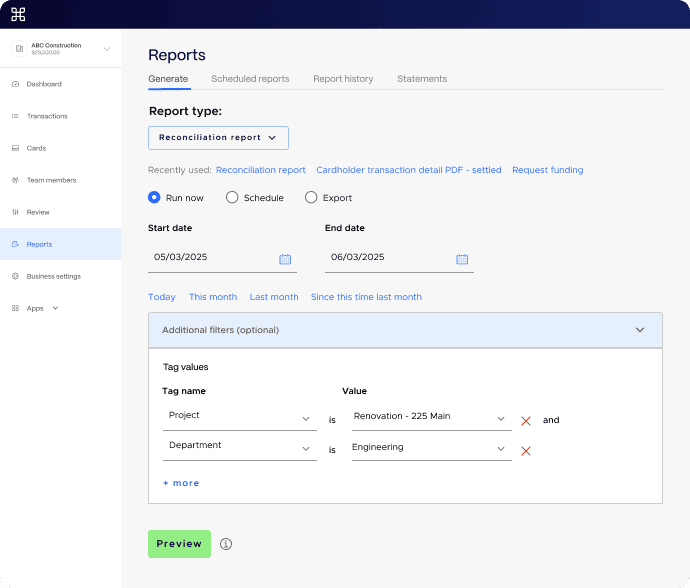
Generate reports and reconcile with just a few clicks
Managing expenses across teams, projects and programs can be a major challenge for many organizations. With enhanced reporting tools and custom filters, you can now generate detailed reports in just a few clicks.
Remove the need to stitch together data from multiple sources, instead, you can track, analyze and reconcile expenses directly within the PEX platform- saving time during both month-end and year-end close. Learn more here.
Real-time control for everyone on your team
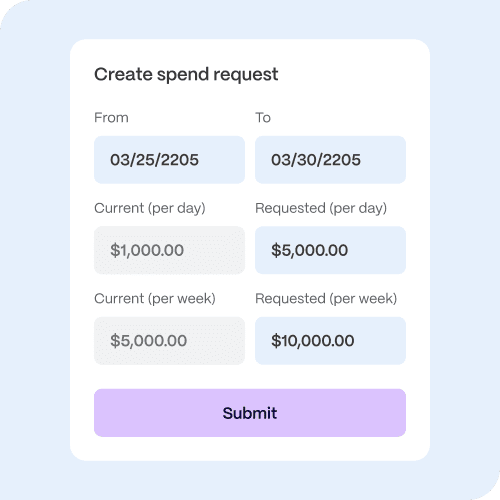
A clear, streamlined process for cardholders to manage their balances and requests helps cut down on admin work. In the PEX mobile app, cardholders can easily request updates to their spend rules, while you stay in control and approve changes instantly.
More flexibility, fewer delays
Instead of sending emails or chat messages, cardholders can submit spend rule requests directly in the PEX mobile app or desktop, keeping everything moving smoothly, even on the go.
Credit Expense cardholders and Prepaid cardholders with auto-funding enabled and can now request spend policy updates right from the mobile app. If a transaction is declined, they’ll immediately see why and can request more funds or a policy change in just a few taps.
The key advantage
Everything happens within the PEX dashboard or mobile app, reducing delays and removing the back-and-forth. Review and approve requests in minutes – no email messages, no bottlenecks, just a fast, transparent process that keeps your team moving forward.
Sync PEX transactions to your accounting software to close your books
We now support seamless integration with over 50 accounting platforms, including NetSuite, Blackbaud, Sage Intacct, QuickBooks Online, QuickBooks Desktop, Aplos, and GreenSlate. This year, we’ve enhanced our accounting integrations to offer even greater value:
- NetSuite: Auto-sync purchases, bill payments, fees, rebates and receipt images into NetSuite to keep your books balanced.
- Sage Intacct: Choose to sync transactions as credit card transactions rather than GL journal entries for improved clarity. Added support for syncing reimbursements.
- QuickBooks Online: Sync multiple receipt images for a single purchase, manual credits, and purchase reversals with ease.
- QuickBooks Desktop: Sync transactions with standardized merchant names, keeping your records clean and consistent.
- Greenslate: Automatically sync purchases, cardholder fees, and receipt images to GreenSlate, ensuring accurate and up-to-date records.
No connector for your accounting software? Export transactions using our Universal Exporter and easily import them into your preferred accounting platform.
Credit enhancements for organizations managing complex spend
Multi-program access
Multi-program access (MPA) is officially available for Credit Expense! Companies with multiple divisions or subsidiaries often struggle to balance centralized control with the need for separate accounting records. MPA offers a single view of all your company’s programs while keeping each entity’s transactions completely separate. See the demo or visit our support site to learn more.
Key Benefits:
- Clean separation – Each sub-account’s transactions remain properly segregated for accounting purposes
- Flexible reporting – View spending across your entire business or drill down into individual sub-accounts
- Scalable structure – Easily add new sub-accounts as your business grows
Self-service credit limit requests
Introducing on-demand credit line increases: Access higher limits for your business account when you need them to cover larger expenses, capitalize on growth opportunities, and keep operations running smoothly. See the demo or visit our support site to learn more.
On-demand credit limit adjustments for cardholders
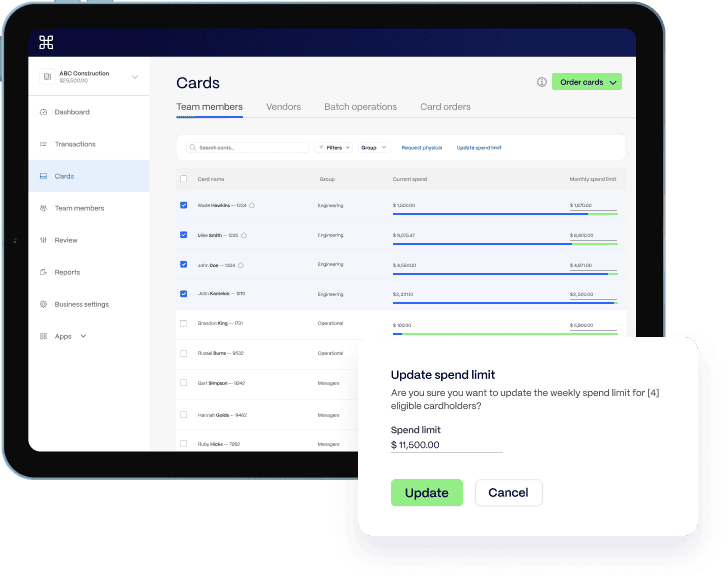
Adjusting spend limits for your cardholders is easier than ever. Want to adjust the available credit directly from the card list? Just edit the amount next to the card, quick and intuitive.
Need to update limits for multiple cardholders at once? Try our new bulk action feature for fast, seamless updates across your entire team.
Streamlined month-end workflows
Lastly, to help finance teams organize data more efficiently and close your books on time, we’ve added new ways to
- Save searches, which can be named, reused, and shared via link to keep teams aligned
- Filter-by-tag, making it easier to locate specific transactions by GL code
- Bulk GL-code assignment, allowing admins to categorize multiple transactions at once
Closing out the year strong—and starting 2026 with momentum
Every update we introduced this year supports a single goal: helping finance teams simplify expense management, reduce manual work, and gain real-time visibility into company spend. Whether you’re preparing for year-end close or evaluating how to modernize your finance tech stack in 2026, PEX gives you the tools to move forward with confidence.
Ready to streamline operations and improve control?
Book a demo to see how PEX fits into your workflow or contact Customer Support to get started with any of the new features.



Opinions, advice, services, or other information or content expressed or contributed here by customers, users, or others, are those of the respective author(s) or contributor(s) and do not necessarily state or reflect those of The Bancorp Bank, N.A. (“Bank”). Bank is not responsible for the accuracy of any content provided by author(s) or contributor(s).