





More control, less hassle: How to manage business expenses with custom policies

As a financial manager, your day can quickly fill up with tedious tasks—chasing down receipts, managing business expenses, and securing manager approvals. Before long, it may feel like you’ve become the office enforcer, constantly reminding teams to stay on top of their accounts.
But what if you could automate the busywork and streamline your approval process?
We’re introducing a new wave of features designed to give you greater control over company spending and out-of-policy rules, making it easier to understand how to manage business expenses efficiently.
Key highlights:
- Customize fiscal year: Align annual spending limits with your organization’s fiscal or benefits year
- Out-of-policy rules: Strengthen compliance policies without slowing down operations
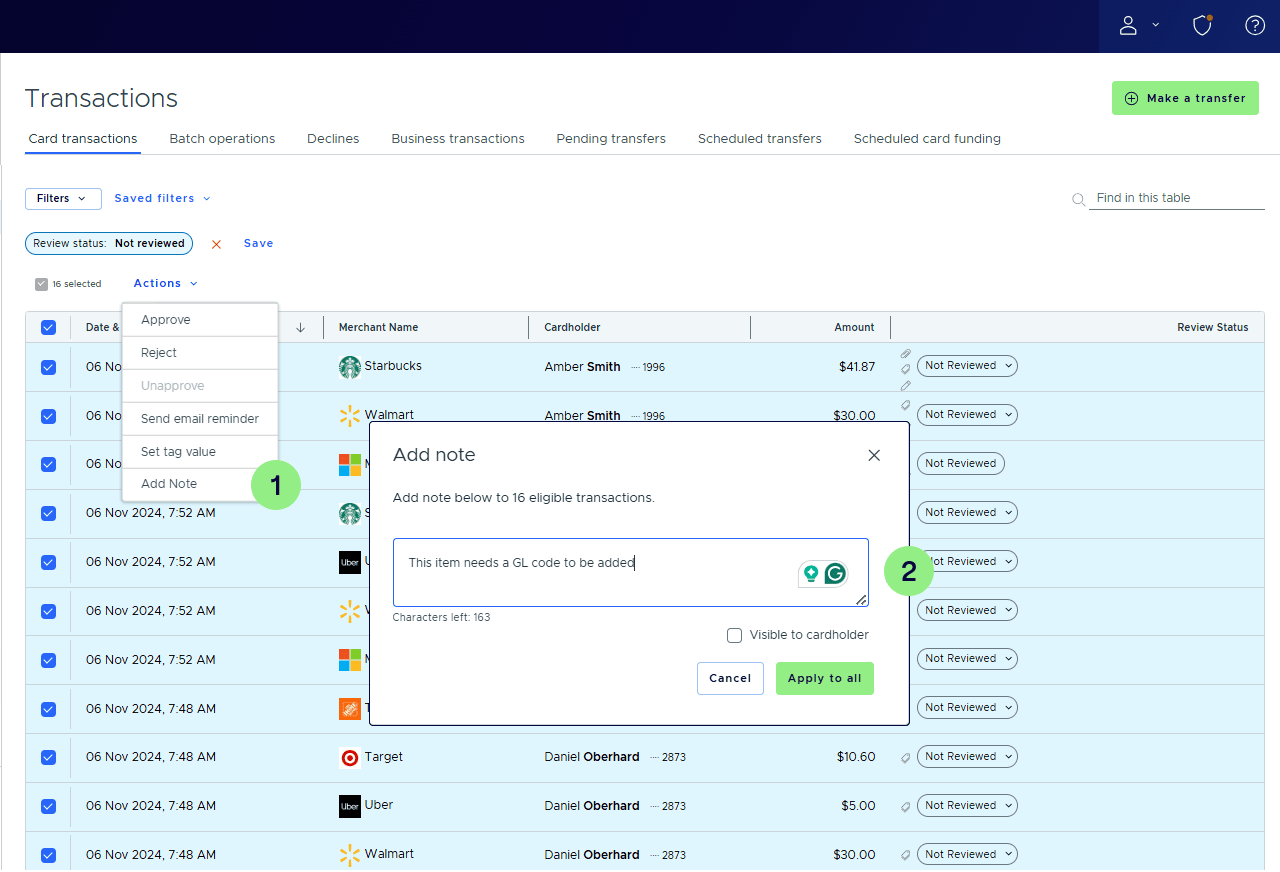
- Bulk assignment: Apply bulk notes to transactions to speed up reconciliation
Streamline approvals with tailored out-of-policy rules
At PEX, we continuously enhance approval workflows to help you manage business expenses more efficiently. Our new out-of-policy rules give you the flexibility to manage critical approvals while maintaining control, ensuring smoother workflows and eliminating unnecessary delays.
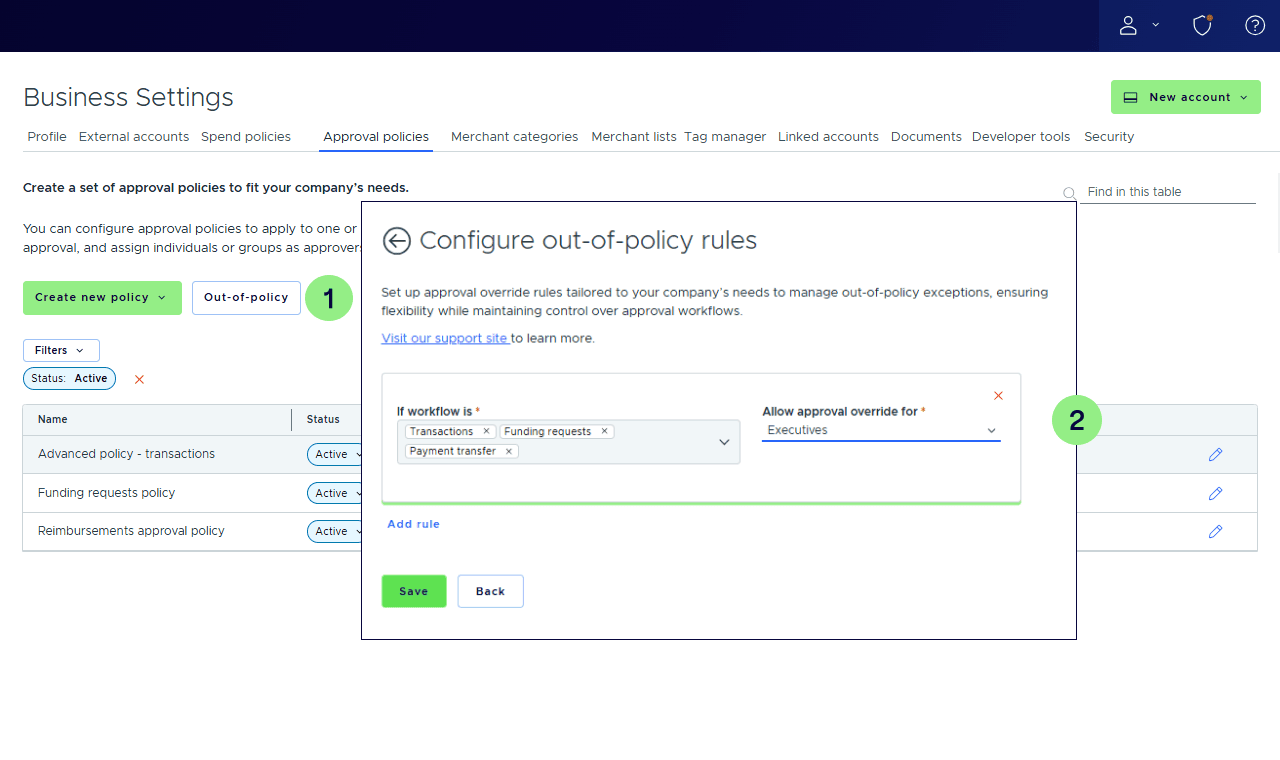
Now, you can configure out-of-policy rules to override approval workflows for transactions, funding requests, reimbursements and more. Designated user groups can approve any item within a specified workflow, bypassing standard approval routes when needed—keeping business processes running smoothly without bottlenecks. Try setting up out-of-policy rules.
How companies manage business expenses with out-of-policy rules

When teams are working under tight deadlines, unexpected needs can arise—like a site manager realizing additional materials are required to prevent delays. In traditional approval workflows multiple sign-offs might be required, which can slow things down and impact project timelines.
Companies with customized out-of-policy rules can allow project managers to override existing rules and approve funding requests—without waiting for full approval. This flexibility ensures that teams can move quickly, keeping projects on schedule while maintaining control over spending with a single click.
Customize your annual budget tracking
Not every organization follows a calendar-year financial structure. That’s why we’ve introduced the ability to customize when your yearly spend limit resets. Organizations that operate on a July-to-June fiscal year can now customize their fiscal year to better track spending, ensuring a clearer view of available funds and simplifying the grant reporting process—one of the most critical aspects of how to manage business expenses effectively.
Letting you align budget tracking with your unique fiscal calendar and giving you better control over financial planning. Visit the support article to customize your calendar year

Save time with bulk transaction notes
Managing high volumes of purchases often means adding important context to multiple transactions—one at a time. For teams looking for ways to manage business expenses with more efficiency, bulk transaction notes eliminate redundant manual work. Now, you can quickly apply the same note across multiple transactions at once, reducing manual effort and speeding up reconciliation.
At PEX, we know managing expenses can feel like a constant juggling act. That’s why we’re always looking for ways to make it simpler. These new features take some of the hassle out of approvals, budgeting and tracking, so you can spend less time on admin work and more time keeping things running smoothly.
Our customers are experiencing real results with these efficiency improvements. As Michelle Ernsdorff-May, Founder of Compass to Care and PEX customer since 2021, shares: “PEX expands our ability to […] quickly provide funds for treatment-related travel, combined with spending controls, that have saved us more than ten hours a month, and allows us to support families.”
Coming soon: Flexible spend with time-based limits
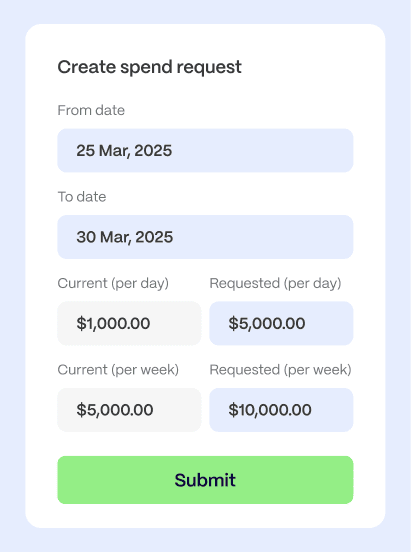
Want to temporarily increase your spend limit for an upcoming international business trip? Meet: spend requests.
With spend requests, employees can quickly request spend increases to their existing card spend limits for a specific time period—for prepaid and credit. It also gives managers full control over approvals with a streamlined approval workflow and out-of-policy rules.
Excited? Join our beta to get early access and share your feedback with our product team.
Get ready to take control of your business expenses with less hassle. Schedule a personalized demo to explore these new features and see how they can help you streamline approvals, enforce policies and save you even more time. Try them out and optimize your workflows today.



Opinions, advice, services, or other information or content expressed or contributed here by customers, users, or others, are those of the respective author(s) or contributor(s) and do not necessarily state or reflect those of The Bancorp Bank, N.A. (“Bank”). Bank is not responsible for the accuracy of any content provided by author(s) or contributor(s).