





AI-powered GL-coding to speed up month-end close

Month-end often means chasing receipts, tracking approvals, and coding transactions. This month, we’re rolling out new tools that simplify month close so you can truly clock out for the weekend.
NEW FEATURES: How AI-powered suggestions can speed up GL-coding
Give your team time back at the end of month. Instead of manually reviewing each transaction, PEX now generates AI-powered suggestions for each new transaction—recommending the correct tag or expense code based on your unique expense categories.
Built directly into your PEX account, AI reviews new transactions as they come in. Scanning receipts and invoices, then suggesting the right expense category automatically.
As teams continue to look to adopt AI and automation into their workflows, PEX makes it easier than ever with solutions that fit into your existing workflow – freeing you up to focus on strategic work.
- Save up to 10+ hours each month
- Reduce coding errors from manual entry
- Keep books reconciled in real time
How to streamline your expense management with PEX
Upload the GL-codes from your chart of accounts as tags. For each new transaction simply assign the correct tag. PEX intelligence learns from your coding patterns and uses receipts data to recommend the right category for new transactions.
For purchases with multiple spend categories, PEX will split the transaction and assign a different GL-code based on the individual items on the receipt or invoice. This allows you to report on different spend types from the same purchase. Look for transactions with multiple recommendations, simply review and approve the suggestions to capture a more granular expense report.
Set up tags to reduce repetitive tasks and speed up your GL-coding. Learn more
- Improve team productivity by cutting out the manual work and improve accuracy from day one. AI-powered suggestions learn based on past behavior, saving you time without the lengthy set-up.
- Get accurate reports you can trust, export them quickly to your accounting platform, keeping all your platforms consistent
- Full control & visibility into spend. Gain enhanced visibility into spending patterns and trends across the business–empowering teams with more data to inform their decision-making.
How to set up sequential approval policies
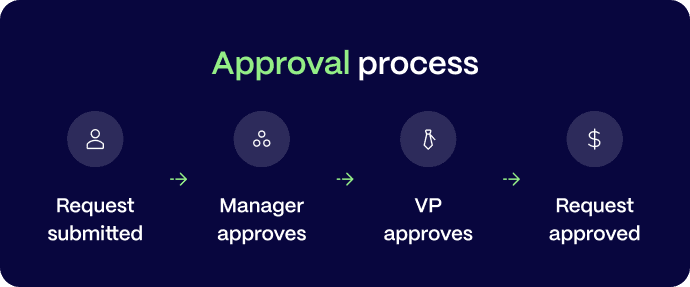
Approvals now happen in sequence. Each level signs off before the next sees it. This keeps your process organized and compliant, with full clarity and control on multi-level approval processes.
With this new feature, items needing multiple levels of approval will be reviewed in order—each must be approved by the first-level approver before reaching the second-level approver.
This ensures that every step is validated in order, preventing confusion and safeguarding compliance. Email notifications are dispatched to the relevant approver at each stage, keeping your team informed and engaged throughout the workflow. Experience a smoother, more organized approval process with our enhanced linear approval configuration.
Once a manager or cardholder is added to an approval workflow, they will be able to view and approve transactions. Explore best practices for managing your approval dashboard.
Add cardholders to your approval workflow
When approval permissions are limited to admin seats it can create a bottleneck when looking to empower team leads and department heads. With this update, you can create user groups with approval permissions, without giving managers access to sensitive company data.
Instead of assigning an admin seat, simply add individuals to a group that allows them to approve transactions. This removes the bottleneck of routing everything through finance and gives employees the power to approve transactions and reimbursement requests directly from the Dashboard, based on your approval policy rules.
Add a cardholder to an approval policy in 4 steps; https://pex.navattic.com/8p2u0x6t
Increase efficiency for everyone by limiting access strictly to what’s needed- reducing risk, and making processes and audits easier. Cardholders get a clear, actionable interface for approvals, while admins retain full control over policies.
To enable the feature simply;
- Update your approval policy and add one or more cardholders as ‘approvers’ in the workflow
Once invited, cardholders that are approvers will;
- Automatically see transactions needing review under the >Review tab
- Receive notifications for transactions and reimbursements needing approval
COMING SOON: Adding card requests to your workflow
Cardholders will soon be able to approve card requests, including funding requests and changes to spend rules, in the approval workflow. Keep a lookout for new features by subscribing to the PEX blog!
Cardholder reports
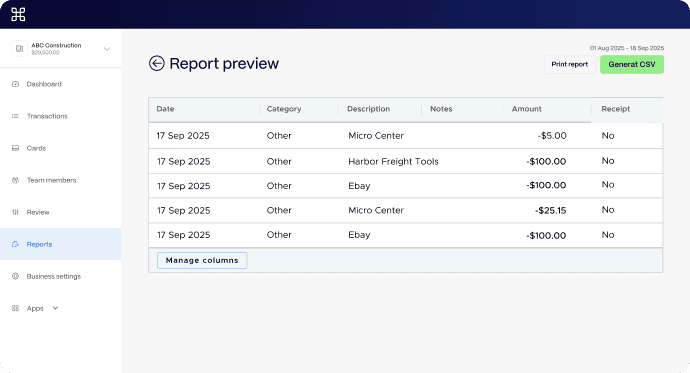
Give your team greater visibility into spend patterns, with the new cardholder reporting view. Team members can filter their individual transactions and requests based on the merchant, tag or attachment. Teams can answer quick data questions on their own, with visibility into the last 12 months of transactions.
Save more time pulling 1-off reports and equip your team to view and generate reports from the cardholder view. Access this view on the >Reports tab in the navigation menu.
FEATURE HIGHLIGHT: How to streamline your reconciliation process with 50+ integrations
Manually reconciling hundreds of transactions at month-end isn’t sustainable. PEX connects directly with dozens of ERP or accounting platforms with a 2 way integration to sync everything automatically.
Automate your workflow with PEX’s no-cost integrations sync. Match transactions, purchase details and receipts directly to your software, ensuring your card transactions and expenses get matched back to the journal entirely and the correct GL-code.
Explore the marketplace with 50+ accounting, ERP and productivity software. For platforms without an API connector, create custom reports and set up automations to run daily, weekly, or monthly CSV reports with our universal exporter feature.
Connecting to your platform only takes a few minutes and is included for free with all PEX accounts.

How nonprofits are saving 10 hours per week with PEX
For teams trying to do more with less, PEX is dedicated to providing continued feature enhancements to increase productivity, give you more control and reduce the amount of time you spend jumping between platforms.
Bluebridge Alliance has been using PEX as their one-stop shop for team member card spend. Using receipt capture, AI-powered matching and 2-way reporting for their bookkeeping. Their team was able to reduce the administrative burden for both their team and partners, saving 10 hours per week!
Read more or reach out to our team to give your team the tools they need to boost productivity.




Opinions, advice, services, or other information or content expressed or contributed here by customers, users, or others, are those of the respective author(s) or contributor(s) and do not necessarily state or reflect those of The Bancorp Bank, N.A. (“Bank”). Bank is not responsible for the accuracy of any content provided by author(s) or contributor(s).